
User Guide
1. Installation
To use ArchUnitNET, install the ArchUnitNET package from NuGet:
PS> Install-Package TngTech.ArchUnitNET
If you want to use MSTestv2, xUnit or NUnit for your unit tests, you should instead install the corresponding ArchUnit extension:
PS> Install-Package TngTech.ArchUnitNET.MSTestV2
PS> Install-Package TngTech.ArchUnitNET.xUnit
PS> Install-Package TngTech.ArchUnitNET.NUnit
2. Quick Start
Create a test class to start testing. We used xUnit with the ArchUnit extension here, but it works similarly with NUnit or other Unit Test Frameworks.
Find this example code here.
2.1. Directives
using ArchUnitNET.Domain;
using ArchUnitNET.Loader;
using ArchUnitNET.Fluent;
using Xunit;

// Add a using directive to ArchUnitNET.Fluent.ArchRuleDefinition to easily define ArchRules
using static ArchUnitNET.Fluent.ArchRuleDefinition;
2.2. Load Architecture
Load your architecture once at the start to maximize performance of your tests replace <ExampleClass> and <ForbiddenClass> with classes from the assemblies you want to test
private static readonly Architecture Architecture =
    new ArchLoader().LoadAssemblies(
        System.Reflection.Assembly.Load("ExampleClassAssemblyName"),
        System.Reflection.Assembly.Load("ForbiddenClassAssemblyName")
    ).Build();
2.3. Declare Layers
Declare variables you'll use throughout your tests up here
// Use As() to give your variables a custom description
private readonly IObjectProvider<IType> ExampleLayer =
    Types().That().ResideInAssembly("ExampleAssembly").As("Example Layer");

private readonly IObjectProvider<Class> ExampleClasses =
    Classes().That().ImplementInterface("IExampleInterface").As("Example Classes");

private readonly IObjectProvider<IType> ForbiddenLayer =
    Types().That().ResideInNamespace("ForbiddenNamespace").As("Forbidden Layer");

private readonly IObjectProvider<Interface> ForbiddenInterfaces =
    Interfaces().That().HaveFullNameContaining("forbidden").As("Forbidden Interfaces");
2.4. Test Cases
Testing if above defined "ExampleClasses" reside in "ExampleLayer"
[Fact]
public void TypesShouldBeInCorrectLayer()
{
    IArchRule exampleClassesShouldBeInExampleLayer =
        Classes().That().Are(ExampleClasses).Should().Be(ExampleLayer);
    IArchRule forbiddenInterfacesShouldBeInForbiddenLayer =
        Interfaces().That().Are(ForbiddenInterfaces).Should().Be(ForbiddenLayer);

    // Check if your architecture fulfills your rules
    exampleClassesShouldBeInExampleLayer.Check(Architecture);
    forbiddenInterfacesShouldBeInForbiddenLayer.Check(Architecture);

    // You can also combine your rules
    IArchRule combinedArchRule =
        exampleClassesShouldBeInExampleLayer
        .And(forbiddenInterfacesShouldBeInForbiddenLayer);

    combinedArchRule.Check(Architecture);
}
Testing if the types in "ExampleLayer" depend on any object in "ForbiddenLayer"
[Fact]
public void ExampleLayerShouldNotAccessForbiddenLayer()
{
    // You can give your rules a custom reason, which is displayed when it fails
    // (together with the types that failed the rule)
    IArchRule exampleLayerShouldNotAccessForbiddenLayer = Types().That()
        .Are(ExampleLayer).Should().NotDependOnAny(ForbiddenLayer)
        .Because("it's forbidden");
    exampleLayerShouldNotAccessForbiddenLayer.Check(Architecture);
}
Testing naming of classes implementing "ForbiddenInterfaces"
[Fact]
public void ForbiddenClassesShouldHaveCorrectName()
{
    Classes().That().AreAssignableTo(ForbiddenInterfaces)
        .Should().HaveNameContaining("forbidden").Check(Architecture);
}
Testing if "ExampleClasses" call any method declared in "ForbiddenLayer" or with name containing "forbidden"
[Fact]
public void ExampleClassesShouldNotCallForbiddenMethods()
{
    Classes().That().Are(ExampleClasses).Should()
        .NotCallAny(MethodMembers().That()
        .AreDeclaredIn(ForbiddenLayer).Or().HaveNameContaining("forbidden"))
        .Check(Architecture);
}
3. What to Check
The following section illustrates some typical checks you could do with ArchUnitNET.
Find this example code here.
3.1. Namespace Dependency Rule

IArchRule rule = Types().That().ResideInNamespace("Model").Should()
                    .NotDependOnAny(Types().That().ResideInNamespace("Controller"));
3.2. Class Dependency Rule
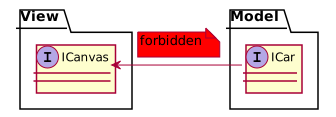
IArchRule rule = Classes().That().AreAssignableTo(typeof(ICar)).Should()
                    .NotDependOnAny(Classes().That().AreAssignableTo(typeof(ICanvas)));
3.3. Inheritance Naming Rule
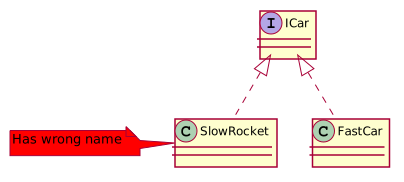
IArchRule rule = Classes().That().AreAssignableTo(typeof(ICar)).Should()
                    .HaveNameContaining("Car");
3.4. Class Namespace Containment Rule
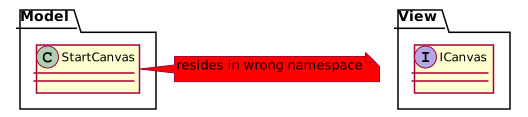
IArchRule rule = Classes().That().HaveNameContaining("Canvas").Should()
                     .ResideInNamespace(typeof(ICanvas).Namespace);
3.5. Attribute Access Rule
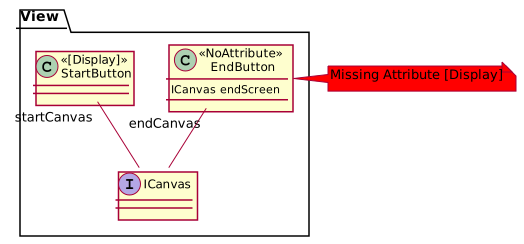
IArchRule rule = Classes().That().DoNotHaveAnyAttributes(typeof(Display)).Should()
                    .NotDependOnAny(Classes().That().AreAssignableTo(typeof(ICanvas)));
3.6. Cycle Rule
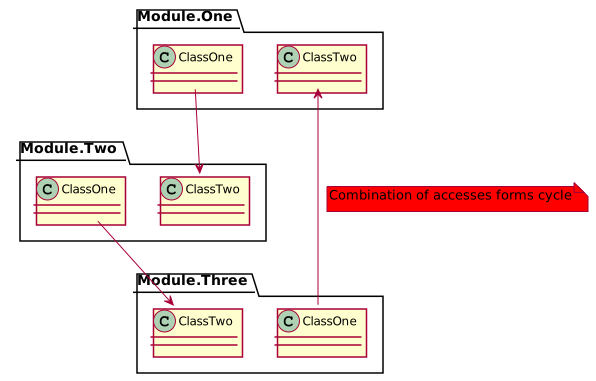
IArchRule rule = Slices().Matching("Module.(*)").Should()
                    .BeFreeOfCycles();
4. How to check
To get a meaningful error message we recommend using the xUnit or NUnit extension.
4.1 ArchUnitNET xUnit/NUnit extension
IArchRule someRule = ...;
someRule.check(Architecture);
4.2 ArchUnitNET no extension
IArchRule someRule = ...;
bool checkedRule = someRule.HasNoViolations(Architecture);
Assert.True(checkedRule);
4.3 PlantUML Component Diagrams as rules
ArchUnitNET can derive dependency rules from PlantUML diagrams. The rule can be created in the following way:
String myDiagram = "./Resources/my-diagram.puml";
IArchRule someRule = Types().Should().AdhereToPlantUmlDiagram(myDiagram);
someRule.Check(Architecture);
The diagrams must be component diagrams and associate types to components via stereotypes.
@startuml
[Model] <<Model.*>>
[Controller] <<Controller.*>>

[Controller] --> [Model]
@enduml
Consider this diagram applied as a rule via AdhereToPlantUmlDiagram(..), then a class that resides in the namespace Model accessing a class in the namepace Controller would be reported as a violation.
Only dependencies specified in the PlantUML diagram are considered. So any unknown dependency (e.g. View.*) will be ignored.
4.3.1 PlantUML Diagram rules
The rules that a PlantUML diagram used with ArchUnitNet must abide can be found in the ArchUnit documentation. In contrast to ArchUnit ArchUnitNet uses a regex as the namespace identifier instead of the two dots syntax.
5. PlantUML file diagram builder
ArchUnitNET can build a dependency diagram from packages on its own. You can see some examples below.
5.1 Full diagram dependencies

string pattern = "ArchUnitNET.(**)";
GivenSlices sliceRule = SliceRuleDefinition.Slices().Matching(pattern);
//Replace ArchUnitNET.Domain.Architecture with any class from your pattern
Architecture arch = new ArchLoader().LoadAssembly(typeof(ArchUnitNET.Domain.Architecture).Assembly).Build();

string path = "diagram.puml";

PlantUmlDefinition.ComponentDiagram().WithDependenciesFromSlices(sliceRule.GetObjects(arch)).WriteToFile(path);
5.2 Structured diagram dependencies
On the previous case there are too many dependencies, this option is suitable mainly for small projects / architectures / slices. With an increase in the number of objects, it makes sense to introduce another type of display - a display with packages. It differs from the previous case only with the modified creation of SliceRule.
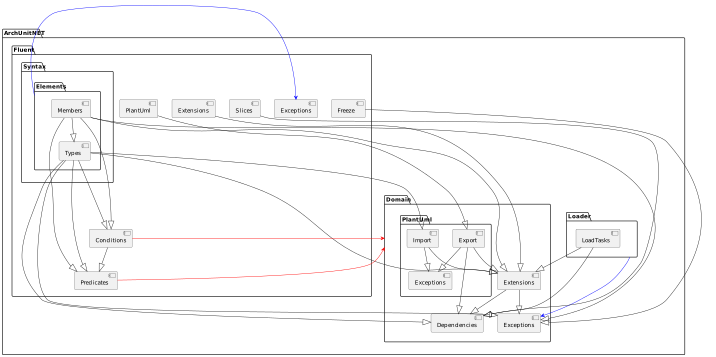
string pattern = "ArchUnitNET.(**)";
GivenSlices sliceRule = SliceRuleDefinition.Slices().MatchingWithPackages(pattern);
Architecture arch = new ArchLoader().LoadAssembly(typeof(ArchUnitNET.Domain.Architecture).Assembly).Build();

string path = "diagram.puml";

PlantUmlDefinition.ComponentDiagram().WithDependenciesFromSlices(sliceRule.GetObjects(arch)).WriteToFile(path);
5.3 LimitDependencies-mod
The previous case still shows a large number of connections. For maximum simplification, as well as demonstrating the overall picture, it makes sense to reformat it into a limited-dependencies version. This kind of display shows dependencies between packages at the same slice level.

string pattern = "ArchUnitNET.(**)";
GivenSlices sliceRule = SliceRuleDefinition.Slices().MatchingWithPackages(pattern);
Architecture arch = new ArchLoader().LoadAssembly(typeof(ArchUnitNET.Domain.Architecture).Assembly).Build();
GenerationOptions g = new GenerationOptions(){LimitDependencies = true};

string path = "diagram.puml";

PlantUmlDefinition.ComponentDiagram().WithDependenciesFromSlices(sliceRule.GetObjects(arch), g).WriteToFile(path);
5.4 Small slices
In order not to display all slices and all occurrences, you can use a single asterisk in the pattern. One star is one slice deep. You cannot mix single () and double (*) asterisks in a pattern.
5.4.1 ArchUnitNET.(*)

    string pattern = "ArchUnitNET.(*)";
    ...
5.4.2 ArchUnitNET.(*).(*)
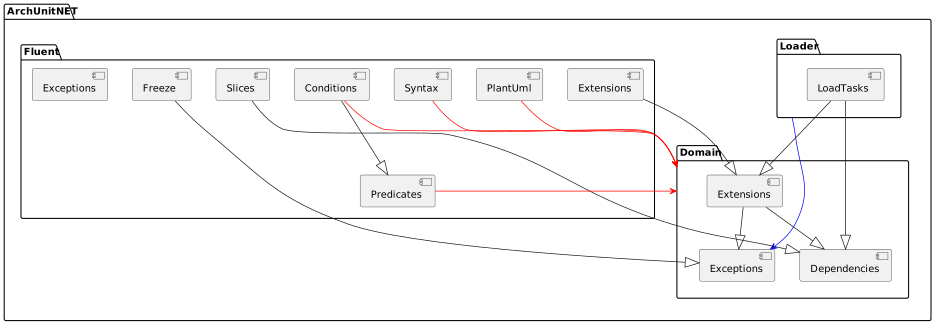
    string pattern = "ArchUnitNET.(*).(*)";
    ...
5.4.3 ArchUnitNET.Fluent.(*).(*).(*)

    string pattern = "ArchUnitNET.Fluent.(*).(*).(*)";
    ...
5.5 C4Style-mod
To enable an C4plantUML-style view of diagrams, set in the GenerationOptions flag C4Style = true.

string pattern = "ArchUnitNET.(*).(*).(*)";
GivenSlices sliceRule = SliceRuleDefinition.Slices().MatchingWithPackages(pattern);
Architecture arch = new ArchLoader().LoadAssembly(typeof(ArchUnitNET.Domain.Architecture).Assembly).Build();
GenerationOptions g = new GenerationOptions(){C4Style = true};

string path = "diagram.puml";

PlantUmlDefinition.ComponentDiagram().WithDependenciesFromSlices(sliceRule.GetObjects(arch), g).WriteToFile(path);
5.6 Focus-mod
Focus mod allows you to show all dependencies on the selected package or out of the package.

string pattern = "ArchUnitNET.(**)";
string focusOnThisPackage = "ArchUnitNET.Fluent.Syntax.Elements"
GivenSlices sliceRule = SliceRuleDefinition.Slices().MatchingWithPackages(pattern);
Architecture arch = new ArchLoader().LoadAssembly(typeof(ArchUnitNET.Domain.Architecture).Assembly).Build();

string path = "diagram.puml";

PlantUmlDefinition.ComponentDiagram().WithDependenciesFromSlices(sliceRule.GetObjects(arch), focusOnThisPackage).WriteToFile(path);
6. Further Reading and Examples
A complete overview of all available methods can be found here.
Check out example code on Github.